ShellX Drive · first public release 0.1.1

Your own cloud drive.
On your own server.

Folders, previews, revisions, sharing, WebDAV and backups — in one Rust binary you run behind the HTTPS proxy you already trust. Desktop sync for Windows, macOS and Linux keeps a local folder in step.

Free & open source (MIT) · self-hosted · your files stay on hardware you control

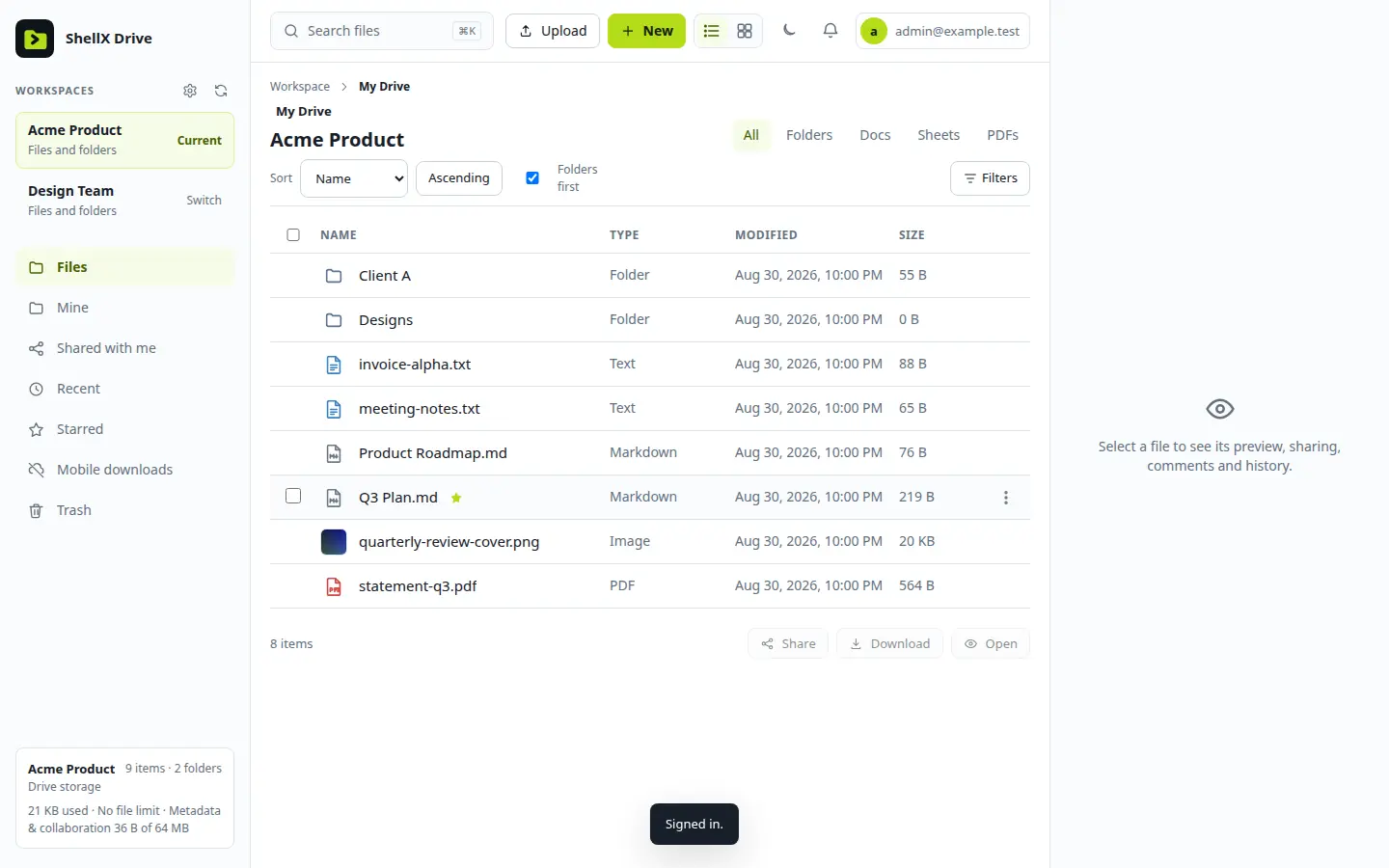
ShellX Drive · My Drive
ShellX Drive web app showing a workspace with folders, text, Markdown, image and PDF files, their types, modified dates and sizes, with workspace switching and storage usage in the sidebar
01 What it does

Everything you expect from a drive.
Nothing rented.

ShellX Drive is for a person, a team or an organization that wants a capable drive without handing its storage to someone else. The server embeds its web app, keeps metadata in SQLite and file bodies in a local data directory, and listens on loopback by default.

files · previews · revisions

Files that behave like a drive.

Folders, previews, search, labels, stars, comments, folder sizes, trash, revision history and conflict copies. Batch actions and ZIP downloads for many files at once, and resumable uploads up to 2 GiB so a dropped connection doesn't mean starting over.

→ preview · restore a revision · undo from trash
◫ workspaces

Workspaces and roles.

Separate workspaces for each client, team or project, with owner, editor and viewer roles, invitations, groups and per-workspace policies.

backups · validate · restore

Backups you can actually restore.

Streaming backups, validation before you need them, restore, retention cleanup, storage usage and quotas — operated from the Admin Center, not from a wiki page of shell commands.

→ back up · validate · restore
⚿ accounts

Sign-in done properly.

Local accounts with two-factor codes and recovery codes, revocable sessions, and a security history of browsers and addresses that signed in.

⇄ webdav · adapters

Open protocols.

Nested WebDAV, an office-editor handoff, and a small Google Drive API subset for adapters — so existing tools have a way in.

▤ every screen

Phone included.

A responsive web app and an installable PWA with mobile browsing, explicit mobile downloads, camera upload and notifications.

≡ agent-native

One API for everything.

The same authenticated HTTP API powers the web app, the desktop clients, the tests and your automation. A bundled agent skill documents safe end-to-end operation.

opens in the browser — no download needed

Images
7 types
png · jpg · jpeg · gif · webp · bmp · ico
Video & audio
6 types
mp4 · webm · mov · mp3 · wav · ogg · plays with your browser's codecs
PDF & Markdown
in place
the browser's PDF viewer · formatted Markdown
Text & code
plain text
up to 256 KiB · txt · log · csv · tsv · json · xml · yaml · toml · js · ts · py · rs · go · sh · css and more
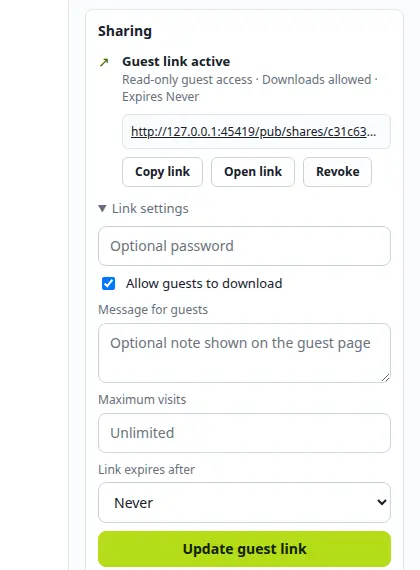
Sharing · guest link
ShellX Drive Sharing panel: guest link active with read-only access, downloads allowed and no expiry, Copy link, Open link and Revoke buttons, and link settings for an optional password, a guest message, maximum visits and expiry
02 Sharing

Share the file.
Keep control.

Give accounts and groups Viewer or Editor access, or send a read-only guest link to someone who has no account at all. Every link carries its own rules, and you can take it back.

  • Guest links for a file or a folder, with an optional password, an expiry or none, a visit limit and a download policy
  • Upload drops: a link that lets someone send you files without seeing anything else
  • Guests preview images and video right in their browser — no account needed
  • A message shown on the guest page, plus visit and download counts per link
  • Revoke a link to stop future access through it
03 Desktop sync

A real folder
on your computer.

Install the desktop app, enter your server's HTTPS address and sign in. Choose a local base folder and up to 100 shared roots below it, and Drive keeps them in step — with conflict copies instead of silent overwrites. Disconnect this PC keeps your local files.

Windows
x64
signed setup installer · uses WebView2
macOS
Apple silicon
signed & notarized DMG
Linux
x64
.deb or AppImage · GTK 3, WebKitGTK 4.1, a tray and a Secret Service session
Connection
1 server
one server and account per install in 0.1 · up to 100 roots
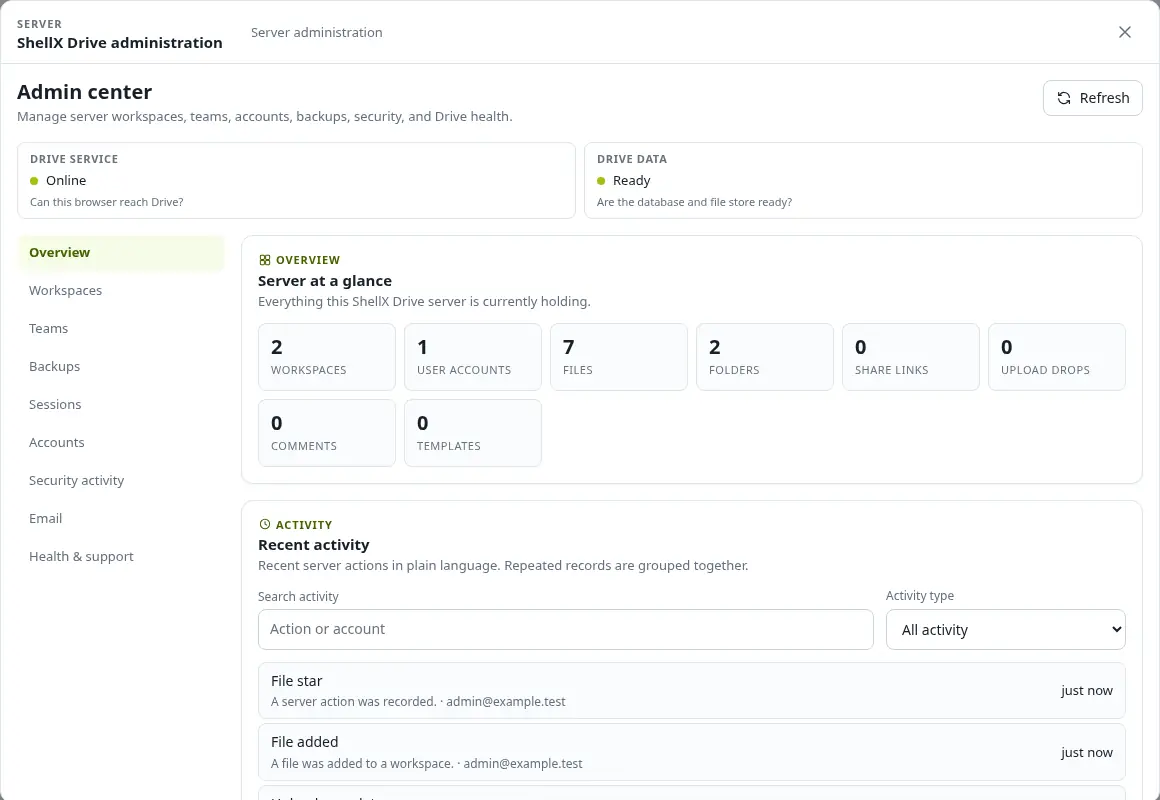
Server administration · Admin center
ShellX Drive Admin Center with service and data health indicators, counts of workspaces, accounts, files, folders and share links, and a searchable recent-activity feed
04 Run the server

You run it.
You can see it.

The Admin Center answers the operator's questions in plain language: is the service up, is the data ready, who did what, and when was the last good backup.

  • Workspaces, teams, accounts, sessions and security activity in one place
  • Backups, validation and restore without leaving the browser
  • Readiness checks and a redacted support bundle when something needs a second pair of eyes
  • A first visitor never becomes administrator: first-admin setup needs a one-time token generated on the server
05 Straight answers

What it is.
And what it isn't.

A drive holds things people care about, so the boundaries are written down instead of discovered later.

01 / Storage By design

The server can read your files

That is what makes previews, search, WebDAV, sharing and backups work. Drive is not end-to-end encrypted. If the host must never see a file, encrypt it on your machine before you upload it and store only the ciphertext.

02 / Hosting Self-hosted

You run the server

There is no hosted sign-up. The server is a Linux x86-64 systemd service that binds to 127.0.0.1:5758; HTTPS comes from the reverse proxy or tunnel you already administer. Admins create the accounts.

03 / Releases Verifiable

Install what was released

Production installs come from the signed artifacts on the GitHub release, checked against SHA256SUMS. The release workflow binds the package, checksums, SBOM, provenance and an artifact attestation to the exact public source revision.

At a glance Feature list

What ships in 0.1.1

Files

  • Create, upload, download, copy, move, rename and search
  • Previews, folder covers, metadata, labels, stars and comments
  • Batch actions and ZIP download of many files at once
  • Trash and revision history

Collaboration

  • Workspaces with owner, editor and viewer roles
  • Invitations and groups, with per-workspace policies
  • Viewer or Editor access for accounts and groups on single items
  • Guest links and upload drops with visit and download accounting

Sync

  • Desktop apps for Windows x64, macOS on Apple silicon and Linux x64
  • Fixed-size delta sync, resumable upload and conflict copies
  • Mobile browsing with offline marks
  • A local base folder with up to 100 shared roots

Tools and automation

  • Nested WebDAV and a small Google Drive API subset for adapters
  • Hand off documents to a configured office editor
  • Search text from UTF-8, Office Open XML and OpenDocument files
  • The same authenticated API the web app uses, plus a bundled agent skill
  • A token-protected Debug API that stays out of the everyday interface

Sign-in and security

  • Local accounts with two-factor codes and recovery codes
  • Revocable sessions and browser/IP security history
  • One-time setup token for the first administrator
  • An optional trusted identity bridge

Operations

  • Streaming backups with validation and restore
  • Retention cleanup, quotas and storage usage
  • Activity logs, readiness checks and email outbox status
  • A redacted support bundle
06 Run it

Your server.
Your proxy.

For production, install the signed release package and follow the first-install guide: it covers host checks, package verification, a hardened systemd service, your TLS proxy and the first administrator. To try it first, build from source and run it on loopback.

Server
Linux x64
systemd service · release .tar.gz with .sha256, or .deb
Listens on
loopback
127.0.0.1:5758 by default · HTTPS from your proxy or tunnel
Storage
yours
SQLite metadata + file bodies in a local data directory
License
MIT
free and open source · built with Rust
shellx-drive.evaluate
01# local evaluation — production uses the signed release package
02git clone github.com/martinsbrezauckis/shellx-drive
03cd shellx-drive
04cargo build --locked --release --bin shellx-drive
05
06export SHELLX_DRIVE_TOKEN="$(openssl rand -hex 32)"
07export SHELLX_DRIVE_BOOTSTRAP_TOKEN="$(openssl rand -hex 32)"
08./target/release/shellx-drive --bind 127.0.0.1:5758 \
09  --data-dir .shellx-drive-data
10
11# open it, paste the bootstrap token, create the first admin
12open http://127.0.0.1:5758
Ready

Install the server.
Sync your folder.

The release carries the Linux server package and the desktop apps for Windows, macOS and Linux, each with checksums and signatures. Verify the download, then follow the guide for your platform.

MIT · 0.1.1 · server: Linux x64 + systemd · desktop sync: Windows x64, macOS Apple silicon, Linux x64
Desktop guides: Windows · macOS · Linux · everything shellX does