A real video editor — trim, grade, caption, mix, render — with an
agent beside you. Record a polished screen demo, cut on the timeline,
edit the transcript, or drive the same actions from code. Every change is
logged, every final render carries a receipt, and ordinary editing and
rendering stay on your machine.
Free & open source (MIT) · Windows, macOS & Linux · local-first;
optional online tools run only when you start them
Product preview · v0.6.116
01 What it does
A full editor. Then the agent part.
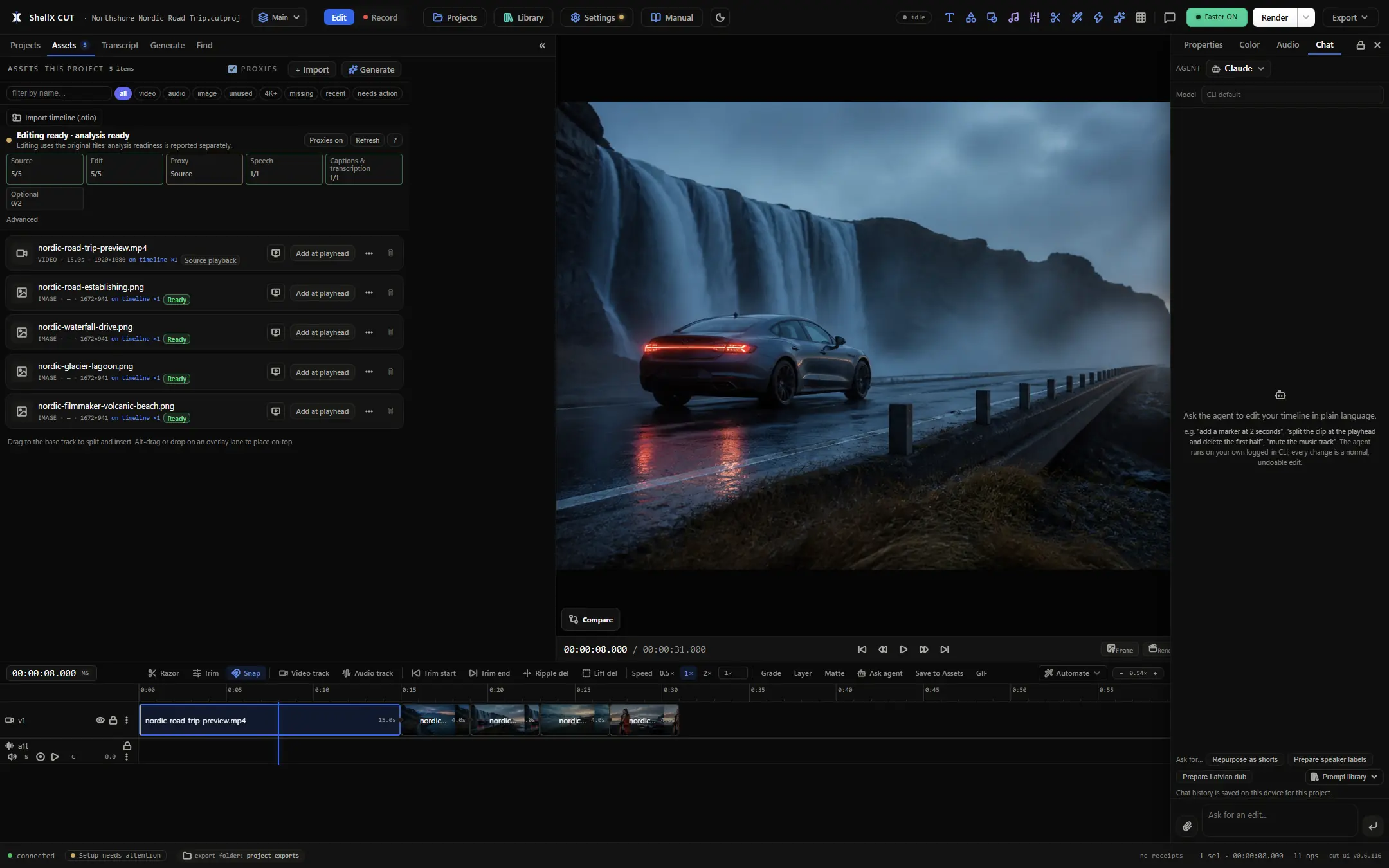
Editing tools in the app and agent operations share one contract underneath the timeline, the
transcript, the REST endpoint and the MCP tools: 308 verbs across 34
domains, all of it in the open.
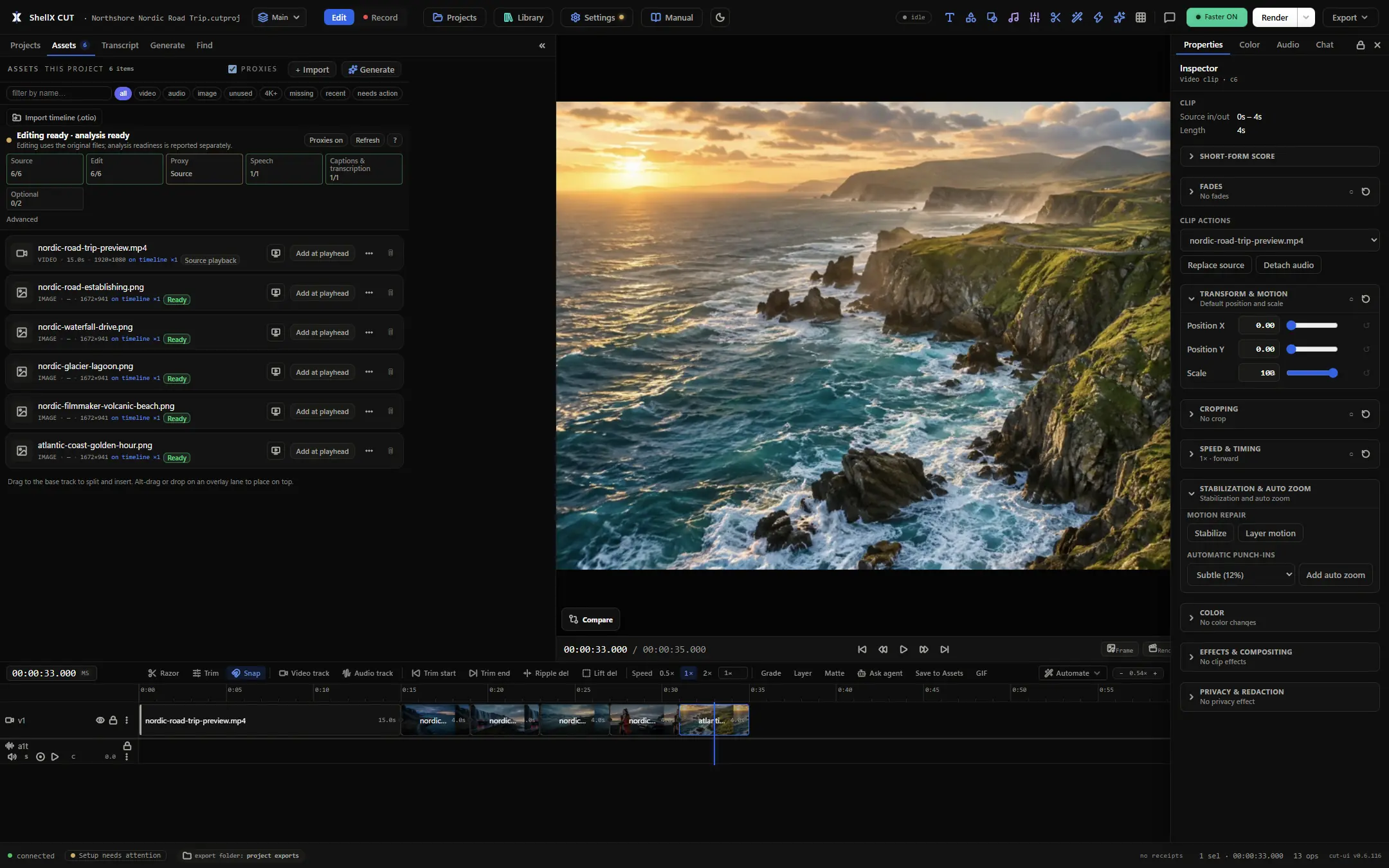
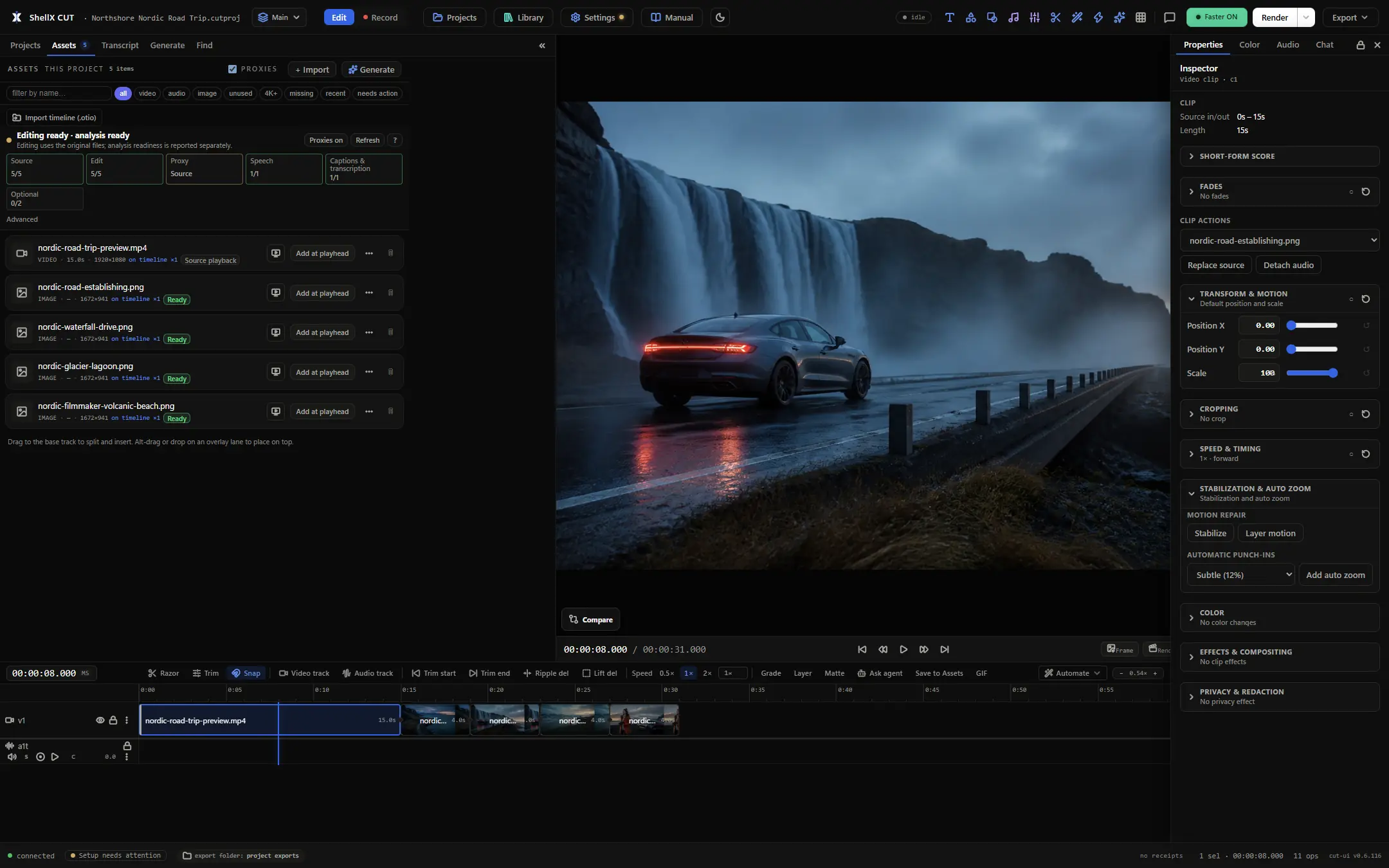
Edit · real sources, a live preview, markers, and the timeline
Demo footage · Nordic road trip · 15 seconds
op log · saved as you work
Your edits save as you go.
Cut saves your project as you edit. Human and agent changes share
an operation history you can review, undo and replay. Reopen the
project to continue from its saved history; Ctrl+S can force an
immediate write.
→ append-only · never rewritten · replayable
↺undo · checkpoints · diff
Undo that goes deep.
Undo appends a new operation instead of erasing history, so nothing
is lost. Guarded workflows checkpoint before they change the edit,
and Review shows the exact diff of everything that happened since.
transcript editing
Edit the words. The video follows.
Cut speaks by deleting text. Transcription runs locally, then you
remove silences, kill the filler words, drop a retake, or assemble a
highlight reel straight out of the transcript — and it never cuts
inside a word. Captions, subtitles and chapters come out of the same
timing.
→ local models · word-level timing · no upload
▦timeline
The NLE parts, done properly.
Split, ripple and lift delete, slip, slide and roll, linked picture
and sound, multi-track layers, markers, speed changes, transitions
and effects.
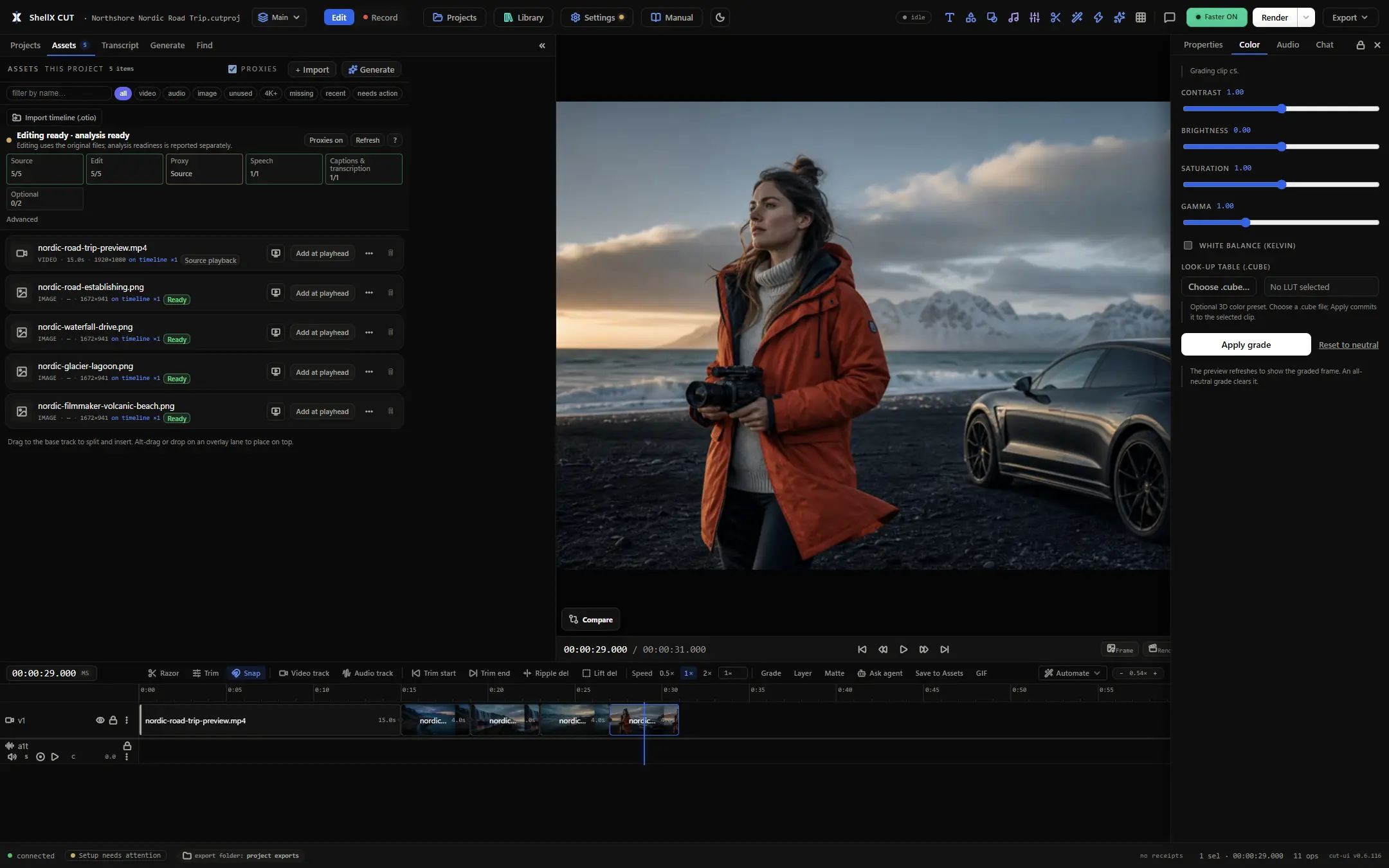
◐colour
Grade, match, auto-balance.
Layered grades on one clip, match a shot to a reference, or
one-click neutralise a colour cast. Save a look and copy it across
the edit.
◉record
Record. Polish. Share.
Capture your screen with optional microphone and system audio. Polished adds
smooth cursor motion, click highlights and automatic zoom, with
an optional camera overlay. Keep the original and edit the result
on your timeline.
⤢reframe · bundle
One edit, every aspect.
Auto-reframe follows the subject instead of centre-cropping, and one
window fans out into a per-platform delivery pack with a ready,
needs-review, or blocked verdict.
♫audio
Music, ducking, clean voice.
Drop a music bed that ducks under speech, clean up a noisy voice
track, set gain and pan per track, and normalise loudness on the way
out.
▤projects · library
Reuse across projects.
A project-local Assets tray for this edit, plus a global library
with folders, tags and favourites for everything you reuse.
⤓interchange
It hands off cleanly.
Final Cut and Resolve XML, Premiere XML, OTIO, EDL, SRT, VTT,
chapters, GIF, audio-only mixes, and platform export presets.
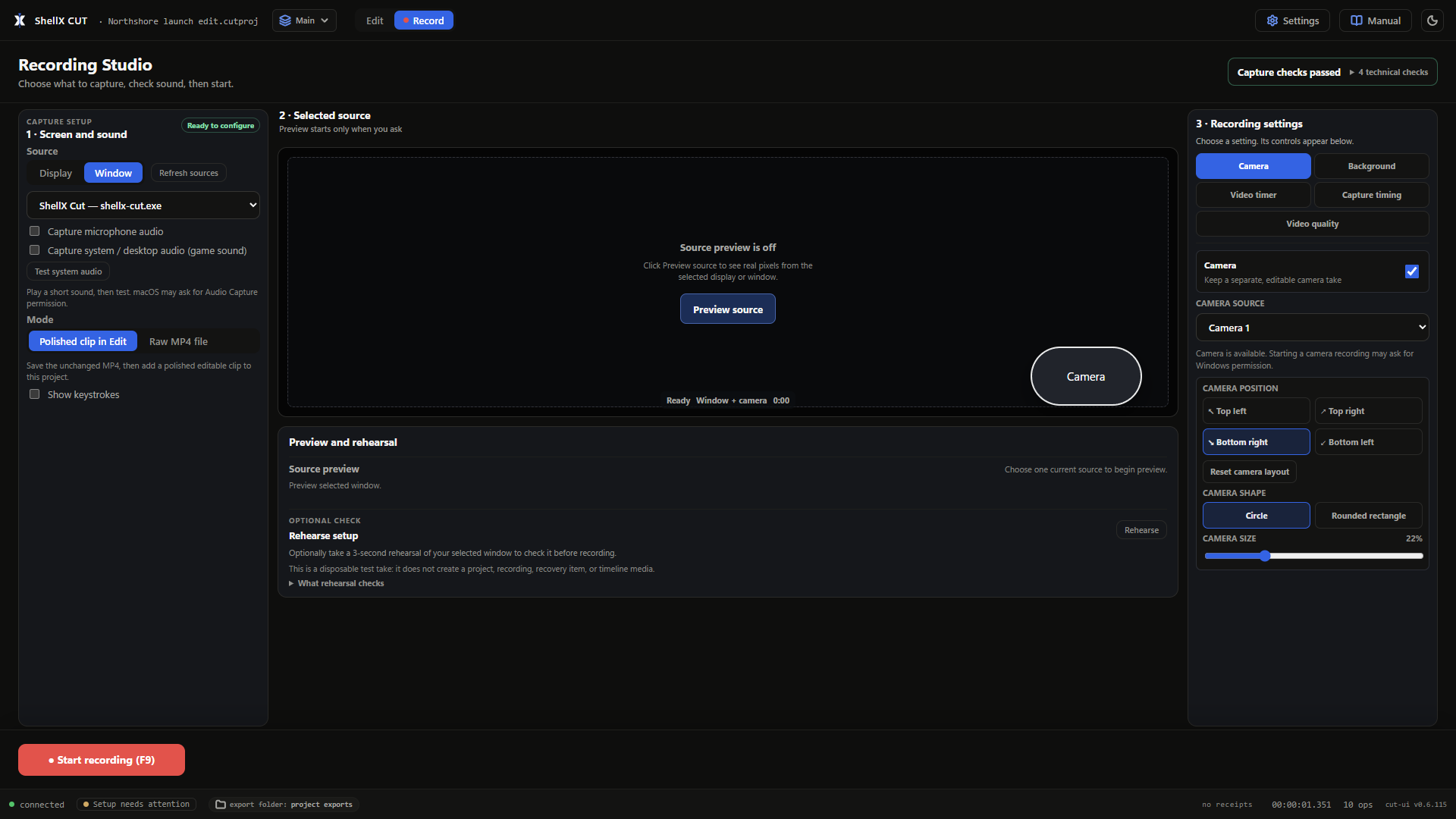
Record · choose Raw or Polished before you start
Screen recording
A clearer demo. Straight from Record.
Choose Polished to guide the viewer through your screen: smooth cursor motion, visible click highlights and automatic zoom make each action easier to follow.
Choose a monitor for the full cursor styling; on Windows and macOS, window capture keeps the native pointer. Click highlights and zoom follow clicks when Cut records a usable pointer position.
Add your camera in any corner, choose a circle or rounded rectangle, and adjust its size. Available microphone and system-audio tracks stay aligned with the screen through polishing and export.
Record on Windows, macOS or Linux. Linux screen capture uses the desktop's monitor-sharing picker; camera capture uses a compatible local device.
Edit · bring your recording onto the timeline
From capture to timeline
Keep the original. Edit the polished clip.
Stop saves the original MP4. In Polished mode, Cut also adds the finished clip to your project, ready for trimming, titles, captions and sound.
Choose whether to show keystrokes or an on-video timer. Then export MP4 or GIF, or keep editing alongside the rest of your footage.
Chat · the agent edits the open project, in plain language
02 Co-editing
Ask for the edit. Review the diff.
Choose the Claude Code, Codex, Grok, or Antigravity CLI already
installed on your machine, then type what you want changed. The agent edits the real
timeline — not an opaque generated movie, but ordinary operations
you can inspect one by one. Each turn records the state it started
from, exactly which operations it added, and whether it is still
safe to roll the whole turn back. Edits apply directly: preview the
result, read the diff, use Step back while it is safe, or ask for
another change.
Agent Chat launches your installed Claude Code, Codex, Grok, or Antigravity CLI and keeps each tool's documented runtime boundary
Cut adds the project MCP connection without copying or rewriting provider login files
Every agent edit is a normal, undoable operation with a written rationale
Attach project assets to a turn by id; source paths stay behind the API
If you edited at the same time, Cut says so and refuses a whole-turn revert rather than rolling back your work
03 Receipts
"Done" has to be measured.
The usual AI editing pitch ends with a file and a promise. Cut ends
with evidence: what was changed, what was measured on the finished
render, and what a reviewer actually saw. Nothing here claims a pass
it did not earn.
01 / LogEvery change
The edit is a record
Each operation stores the actor, arguments, rationale and a
replayable result. History is appended, never rewritten — so the
Review rail can reconstruct the edit and undo never quietly loses
a step.
→ op 0142 edit.split you→ op 0143 transcript.cut_words agent · "drop the second take" checkpoint · "before captions"diff> 7 ops · 2 tracks
02 / ChecksDeterministic
Final render, a receipt
A final render automatically runs an instrument battery over the
edit, the measured media facts and the actual output file — cuts on
word boundaries, loudness, captions present, black or frozen frames,
silence at the edges, duration against the edit.
An optional review pass samples frames from the finished file and
hands them to a subscription CLI you already have — Claude, Codex,
Antigravity, then Grok — alongside the measured facts. No usable
CLI means a plain "not run". It never manufactures a pass.
A factual rundown of ShellX Cut
v0.6.115 — no jargon, updated
every release.
Editing and projects
Split, trim, ripple and lift delete, slip, slide and roll, snap, markers, speed changes and custom speed-ramp curves
Linked picture and sound plus layered tracks with hide, lock, reorder, mute, solo, gain and pan controls
Projects, project-local Assets and a reusable Library, with Sequence Index search across every timeline
Find the exact shot by clip name, marker, or what is visible in the frame; mark a source range and insert only that range
Media Health, proxies and Smart Bins keep large or mixed-format projects organised and ready to edit
Familiar shortcut presets plus portable keymap profile import and export
Scene detection, cut-to-beat, multicam sync and automatic switching to whoever is speaking
Speech, captions and text
Transcription on your own machine — a fast default model, a stronger tier for hard languages, and a Whisper fallback
Delete words to cut, strip silences and fillers, or assemble a highlight reel from the transcript
Burned-in and animated captions, styling presets, reflow, shifting, and animated titles
Translate captions, label who spoke when, or re-voice a clip into another language on a new track
Look and sound
Layered grading, colour match to a reference shot, and one-click auto white balance
Masks and privacy blurs for faces, plates and on-screen text, including timed redaction
Music beds that duck under speech, voice cleanup, per-track EQ, gain and pan
Scopes — waveform, vectorscope, histogram — with broadcast-range and clipping warnings
Recording and recovery
Screen capture with microphone and system audio, kept as separate raw streams
Preview the selected source, test your sound, and run a disposable rehearsal before recording
System audio without hijacking your speakers on recent Windows, and via a Core Audio tap on macOS 14.2+
Stop and auto-edit at the captured frame rate, with microphone and system audio aligned from measured timing
F9 starts or stops with your current settings when the OS shortcut is available; F12 adds a marker
Crash-resilient checkpoints can recover a playable prefix; Health & Recovery reports any bounded lost tail
Raw saves the original MP4; Polished adds smooth cursor motion, click highlights and automatic zoom, then puts the result on the timeline
Camera overlays on Windows, macOS and compatible Linux devices: four corners, circle or rounded rectangle, adjustable size
Optional keystrokes and on-video timer, plus MP4 and GIF export for the polished clip
Generate and delivery
Editable Generate templates, prompt plans and storyboards preview before they create normal undoable timeline edits; planners can use your installed Claude Code, Codex or Grok CLI
Render with a chosen codec, bitrate, geometry and loudness target — or queue a batch of them
Subject-following auto-reframe for vertical and square, with an honest crop receipt
One window into a per-platform pack: reframed video, windowed captions, thumbnail, receipt
A preflight that catches a black ending, a silent export or a letterboxed source before you wait for the render
Agents and review
Agent Chat launches your installed Claude Code, Codex, Grok or Antigravity CLI to edit the open project through the same reversible verbs the buttons use; Antigravity is currently available on macOS and Linux
Provider routes preserve their documented configuration and permission boundaries; Cut does not copy or rewrite login files
MCP server and a local REST + WebSocket API — 308 verbs across 34 domains, one contract
Receipt-bound output checks can be rerun without losing the original output identity
Jobs retain controls across reloads and explain progress, queue position, resource waits and child work
Recipes: named, gated workflows that show their exact plan before they run
Autopilot: render, verify, apply only low-risk fixes from the receipt, verify again — under one checkpoint
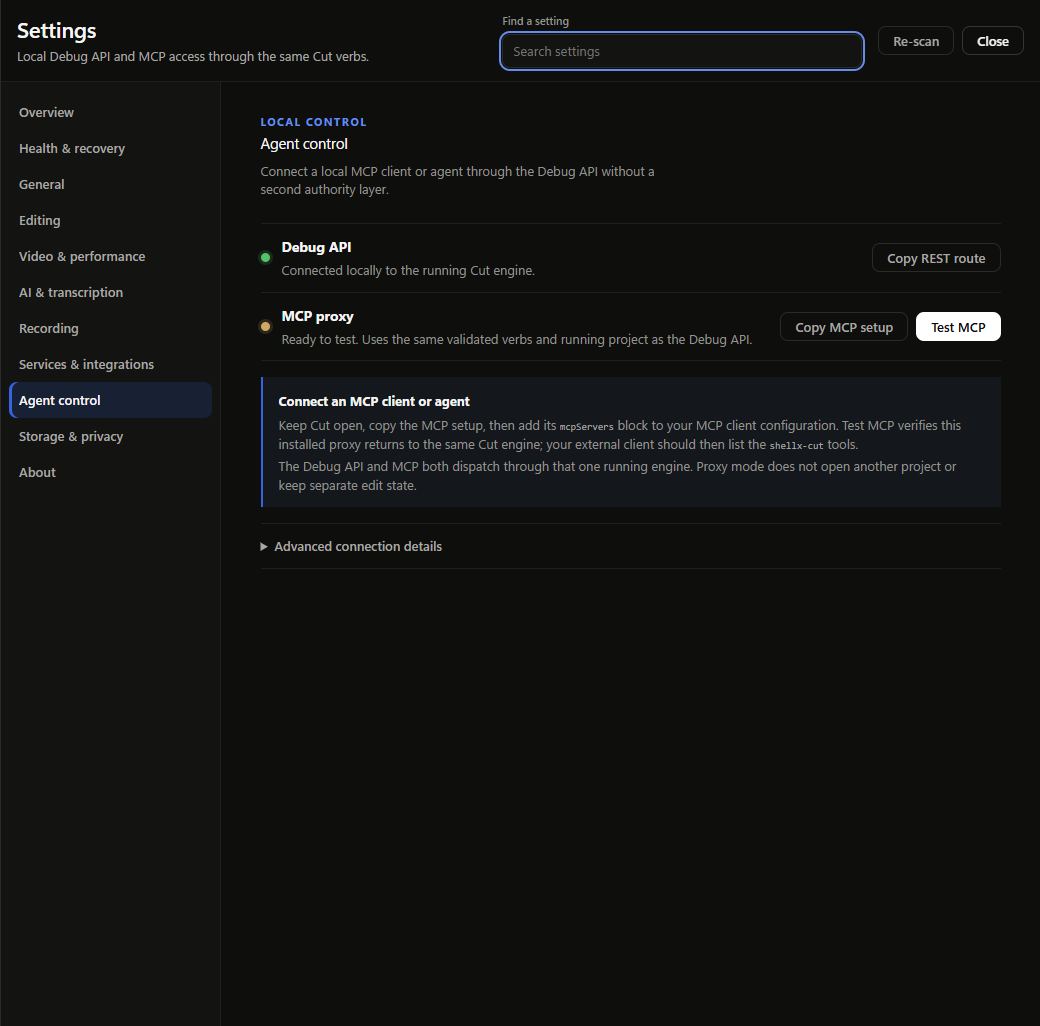
Settings · Agent control · the local Debug API and MCP proxy
05 Drive it from code
One verb API. Four ways in.
The timeline, command line, REST endpoint and MCP tools share the
same editing engine and open project. Inspect the live schema,
dispatch an edit, then review the result in Cut. Point any MCP-capable coding agent
at it, copy the config out of Settings, and press Test to prove it
landed on the same running engine.
Loopback by default — Cut refuses a non-local bind and rejects browser cross-origin requests
MCP tools and REST routes are generated from the same schema
Long jobs return a job id you can poll, cancel, and watch on a WebSocket event stream
A headless engine runs with no window at all — open the UI later and see live state
cutd.verb.curl
01# loopback only — no token, no LAN-facing port
02cutd serve --headless # http://127.0.0.1:6161
03
04# bring in footage, then cut the words instead of the waveform
05curl -X POST .../api/verb/media.import \
06 -d '{"path":"/footage/take-01.mp4"}'
07curl ... /api/verb/transcript.remove_fillers
08
09# render — the deterministic checks run themselves
not bundled · use a system copy or let Cut fetch one
Ready
Open the editor. Bring an agent.
Free and open source under MIT. No account to install. Projects, edits
and normal renders stay local; optional provider workflows use only
the CLI subscriptions and services you choose.
Use Settings → Updates to check for a new version on Windows or macOS,
or download the latest installer directly. Linux installs and updates
use the .deb or .rpm package downloads.
signed · Windows 11 · macOS (Apple silicon) ·
v0.6.115 open beta